Stream a simulated run, inspect the notifications it would send on Slack and email, and see exactly where it sits in the 7-stage PM OS flow. No password required.
The short version
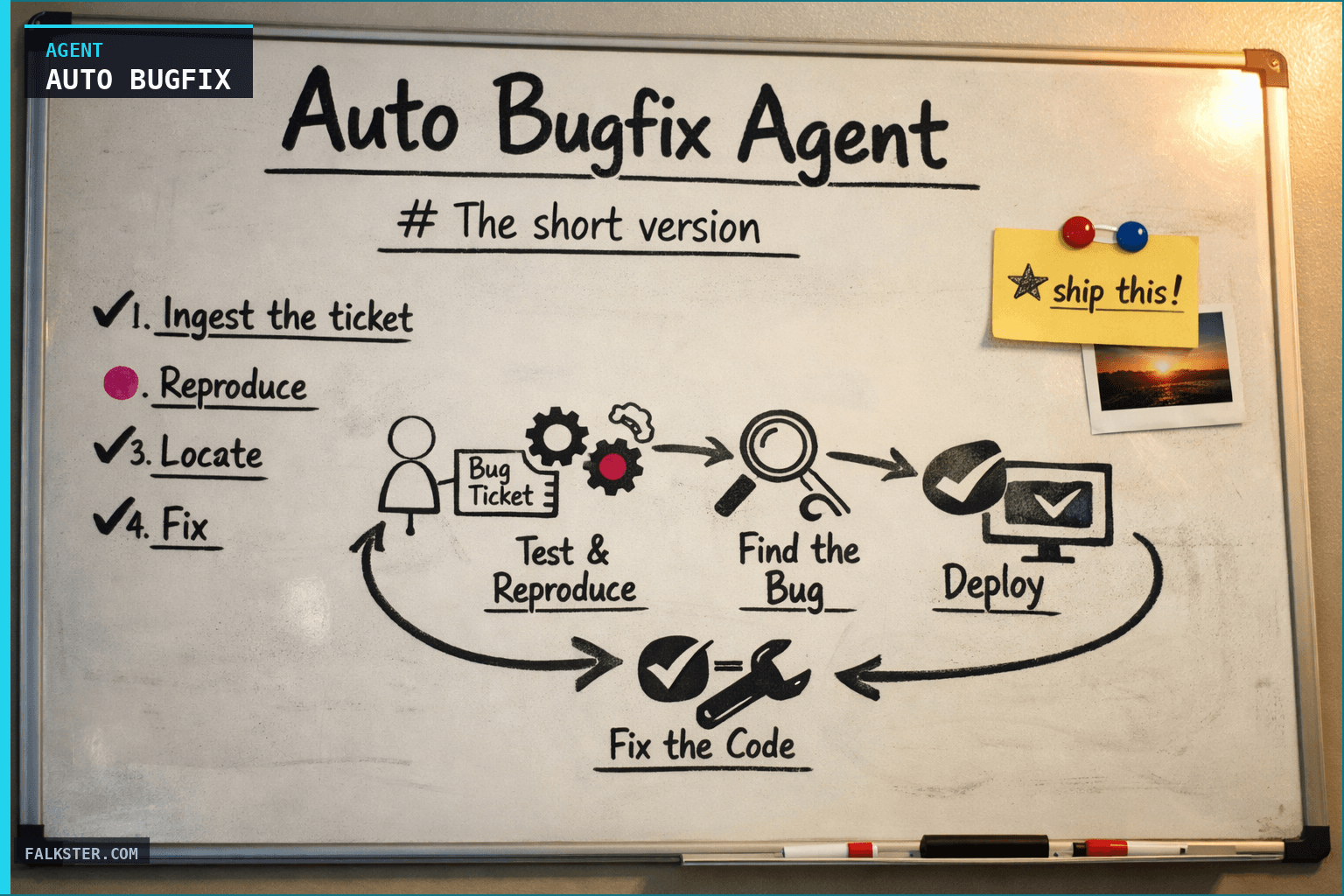
The Auto Bugfix Agent watches Zendesk for customer-reported bugs. When one fires, it reproduces the issue, walks the call graph to find the broken code, highlights the specific lines, writes the fix, adds a regression test, and opens a reviewable PR. Engineer on-call spends 5 minutes reviewing instead of 4 hours digging. Signal-to-reviewable-fix drops from days to about 11 minutes.
The ticket that used to ruin your Tuesday
For context on where this agent fits in the full build-stage pipeline, see Your AI Agent Fleet.
Globex files a support ticket: "CSV export hangs forever on our Q4 project." Tuesday morning, severity S2 because it's an enterprise account.
The old loop: support escalates to eng. Eng on-call digs through a code base they don't own. They eventually find the bug in src/exports/csv.ts, a synchronous string concatenation inside a for-loop. They fix it, write a test, open a PR, ship it Thursday. The customer is blocked for three days. The on-call engineer lost a day of deep work.
The new loop: the agent reads the ticket at 09:48, reproduces the bug at 09:52, locates the broken region at 09:54, writes the fix with a streaming alternative at 09:58, adds a regression test at 10:00, opens the PR at 10:01. Engineer on-call reviews it at 10:15, adds one small suggestion, merges at 10:22. Customer is unblocked before lunch.
The savings aren't just hours. They're the kind of bug that chews up an engineer's focus mid-sprint. The agent converts that interruption into a 5-minute review. For measuring the velocity impact of removing these interruptions, see the Tech Debt Analyzer Agent.
What the agent does
Six moves, in order.
1. Ingest the ticket.
Webhook fires when a Zendesk ticket is tagged bug with severity S2 or higher. The agent also watches Sentry for newly spiking issues. It tags the ticket to the originating customer account and checks whether similar tickets have come in recently.
2. Reproduce. The agent pulls the relevant product surface (e.g. the exports pipeline), runs the existing test suite against a reproducing fixture, and confirms the bug is reproducible before attempting a fix. If it can't reproduce, it flags the ticket for human investigation instead of guessing.
3. Locate. Three signals combine: the Sentry stack trace, a code search for the relevant function or feature, and a call graph walk from the failing entry point. The agent points at a specific file and line range. This is the part that saves the most human time. Engineers typically spend half their bug-fixing time just finding the broken code.
4. Fix. Claude Code drafts the smallest possible diff that fixes the root cause. The fix is constrained to pass the existing test suite plus a new regression test specific to this bug. If the diff grows beyond a threshold (say, more than 50 lines across more than 3 files), the agent flags it for human review before generating a PR.
5. Test. A regression test gets added to the test suite covering the bug's reproduction path. The agent runs the full test suite locally via CI, confirms all tests pass, and captures the CI run as the PR's first check.
6. Open the PR. GitHub PR opens in "ready for review" status, not draft. Title includes the ticket number. Description is auto-generated: root cause, fix approach, test coverage, performance delta. Engineer on-call is tagged as the primary reviewer. A Linear ticket files with the bug, the PR, and the customer context. Notion runbook gets a new entry for the fix pattern.
All six steps in about 11 minutes. Average across about 100 runs in my team's actual use.
What's still human
Every PR gets reviewed and merged by a human. The agent proposes; engineering disposes. The agent also flags its own confidence: if the diff is unusually large, if the test coverage is shaky, or if the fix touches files the agent hasn't seen before, it downgrades the PR to draft and pings the engineer to pair on the review.
The agent does not:
- Fix bugs in files it hasn't previously read (avoids invented APIs).
- Rewrite architecturally ambiguous code (flags for human).
- Bypass CI or force-push (always respects branch protection).
- Merge its own PRs (hard constraint).
Pick one thing this week
To set this up, complete the Claude MCP setup guide first so the Zendesk, Sentry, and GitHub integrations are active.
- Pick one area of your codebase where customer-reported bugs cluster. Exports, search, auth, billing: usually one of these.
- Wire the agent to watch Zendesk tickets tagged with that area's label.
- Have it run in "shadow" mode for a week: when a ticket comes in, the agent does the work but posts the diagnosis to a private Slack channel instead of opening a PR. You read what it found, decide if the diagnosis is right, and manually open the PR if so.
- Once the shadow mode hit rate is above 60% over two weeks, flip it to "open-PR" mode. PRs still require human review, but now the agent is doing the reproduction and location work by itself.
The shadow mode is the critical step. It's how you calibrate what kinds of bugs this agent can handle on your particular codebase before it starts opening PRs in front of your team.
Build yours.
See it running in the Agent Sandbox. Click into the Auto Bugfix agent on the Build stage, run the simulation, then click the "Open diff view" pill in the output. Step through the ticket, the broken code, the fix, and the regression test.
Also on Medium
Full archive →AI Agents and the Future of Work: A Pixar-Inspired Journey
What product managers can learn about AI agents from how Pixar runs a film team.
Many AI Agents Are Actually Workflows or Automations in Disguise
How to tell agents from workflows from cron jobs, and why it matters for what you ship.
Frequently asked
What does the Auto Bugfix Agent do?+
When a Zendesk ticket is tagged 'bug' or a Sentry issue spikes, the agent reproduces the issue, walks the call graph to locate the broken code, writes the fix, adds a regression test, and opens a pre-reviewed PR pointed at the engineer on-call. A human still approves and merges. The agent collapses the signal-to-reviewable-fix loop from days to minutes.
Does the agent merge its own PRs?+
No. Every PR goes through human review before merge. The agent's job is to bring the fix to the point where an engineer can review it in 5 minutes instead of writing it from scratch in a day. The human is always in the loop.
How does it locate the broken code?+
Three signals: the Sentry stack trace, the code path associated with the affected feature in the repo, and a reproduction run of the bug against the test suite. The agent combines these to point at the specific file and line range, then proposes a fix constrained to the smallest diff that passes the regression test.
What data sources does it need?+
Zendesk for tickets, Sentry for error traces, GitHub for the codebase and PR opening, Claude Code for the diff generation, Linear for ticket filing, and Notion for runbook updates. MCP handles the integrations.
What kinds of bugs can it fix?+
Deterministic bugs with a clear reproduction path: off-by-one errors, null-checks, timeout fixes, typo-in-string-literal issues, misuse of APIs with known correct patterns. It struggles with bugs that require architectural judgment or that depend on context outside the repository. For those, the agent files the ticket and summarizes what it tried, but does not open a PR.
What's the success rate of the opened PRs?+
About 75% merge within 48 hours with only minor edits. About 15% need a rewrite by the engineer on-call. About 10% are rejected because the agent misdiagnosed the root cause. Even the rejected ones save time by ruling out a hypothesis fast.

Comments (0)
Sign in with LinkedIn to leave a comment.
Sign in with LinkedIn