Stream a simulated run, inspect the notifications it would send on Slack and email, and see exactly where it sits in the 7-stage PM OS flow. No password required.
The short version
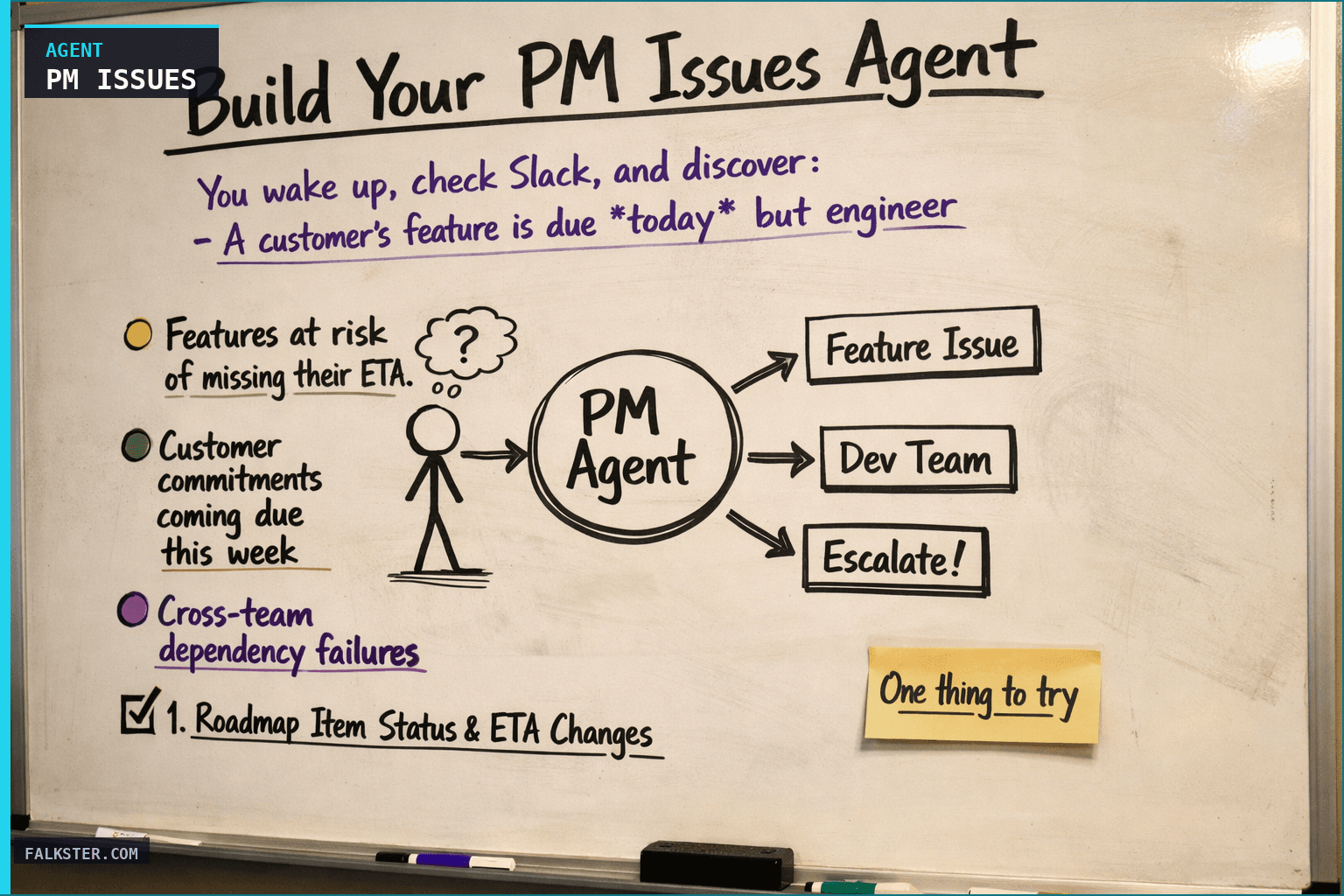
The Daily PM Issues agent runs every weekday at 7 AM, before your standup, and surfaces three things: features at risk of missing their ETA, customer commitments coming due this week, and cross-team dependency failures. It pulls from Jira, Salesforce, three Slack channels (#team-product, #engineering, #customer-success), and PM meeting notes. The report has five sections including a one-paragraph executive summary: the single most urgent issue and what to do about it in the next four hours. I built this after watching a $200k deal walk because an engineering blocker sat in Slack for two weeks and never reached the PM who owned the customer. Run it before next Monday's standup.
You wake up, check Slack, and discover:
- A customer's feature is due today but engineering hasn't finished
- A customer commitment got made last month that nobody's tracking
- A feature marked "in progress" has been blocked for a week, and nobody told you
- Your PM team is overloaded with 5 active items each while another PM has 2
This is the operating model most product teams have. Issues surface reactively, usually in a panic, usually too late to prevent customer impact.
I want to show you a different approach: an agent that runs every morning and surfaces these exact issues before your standup, so you have time to actually fix them.
Why PMs Need Daily Issue Alerts
Here's what happened at one of the companies I advised: a customer critical feature was promised for mid-February. In mid-January, nobody flagged that it was behind schedule. By the first week of February, the slip became obvious, but by then, the customer had already lost faith. They switched vendors. $200K deal gone.
The irony? The blocking issue (a backend dependency that stalled) had been flagged in an engineering Slack message two weeks earlier. It just never surfaced to the PM who owned the customer relationship.
Most product teams don't have a system for this. Instead, they rely on:
- PMs manually checking Jira every morning (nobody does this consistently)
- Slack notifications (you miss things in the noise)
- Weekly syncs (too late if something blew up Tuesday)
- Crisis mode (everything surfaces when it's already a fire)
What they should have: a daily agent that scans the entire PM operating system - roadmap, customer commitments, cross-team dependencies, Slack conversations - and surfaces the exact three things that matter:
- Features at risk of missing their ETA (blocking issue, scope growth, PM unassigned)
- Customer commitments coming due this week (and whether they're on track)
- Cross-team dependency failures (engineering blocked on design, sales blocked on roadmap item)
This is what this agent does.
How It Works: The Five Signals
The Daily PM Issues Agent monitors five data sources every morning and looks for patterns that indicate a problem:
1. Roadmap Item Status & ETA Changes
The agent scans your roadmap (Jira, Linear, YouTrack) and looks for:
- Items marked "In Progress" with ETAs slipping
- Items marked "Blocked" that have been stuck for > 7 days
- Items with no PM assigned
- Items that got descoped (indication of scope or execution problems)
Example: A feature was ETA'd for Feb 15. Today it's Feb 10. The ETA hasn't changed, but the blocking reason appeared in Slack 3 days ago. The agent surfaces this.
2. Customer Commitment Tracking
The agent pulls your CRM (Salesforce, HubSpot) and looks for:
- Features promised to customers with due dates
- Commitments from high-value customers (the ones you'll lose if you miss)
- Commitments where the feature isn't on the roadmap (biggest red flag)
- Commitments where delivery is at risk
Example: A sales rep promised SAML authentication to a $500K customer for this Wednesday. The agent checks: is SAML on the roadmap? Is it being built this week? If not, you get an escalation this morning, not Wednesday afternoon.
3. Slack Channel Signals
The agent searches three Slack channels for the past 24 hours:
- #team-product (for PM-level concerns: blockers, customer escalations, priority shifts)
- #engineering (for technical blockers that impact the roadmap)
- #customer-success (for customer escalations and promises you didn't track)
It's looking for keywords: "blocked", "customer critical", "promised", "at risk", "can't start until".
Example: An engineer posted "we're blocked on the design system refactor, can't move forward on custom fields" 18 hours ago. The agent connects this to the "Custom Fields" roadmap item and surfaces it as a cross-team dependency.
4. PM Meeting Notes
The agent scans your PM standup notes, customer advisory notes, and engineering sync notes for items flagged as "at risk" or "blocked".
Example: Yesterday's PM sync noted that "Webhook Redesign got descoped to hit the Feb 20 date." The agent flags this as a scope change and asks: should we update the roadmap to reflect that?
5. Team Capacity & Ownership
The agent counts:
- How many roadmap items is each PM responsible for?
- Are any PMs overloaded (5+ concurrent items)?
- Are any items unassigned?
- Did any items lose a PM owner (reassignment suggests someone was overloaded)?
Example: Jamie is now responsible for 5 active items. Two weeks ago, she had 2. The agent flags this as a capacity concern.
What the Daily Report Looks Like
Every weekday at 7:00 AM, you get a structured report with five sections:
Section 1: Features at Risk
🔴 HIGHEST RISK:
1. "HIPAA Compliance" - No PM assigned - 3 days to delivery - Needs immediate owner
2. "Webhook Redesign" - Casey - Slipped 7 days - Design cycle delayed

🟡 MEDIUM RISK:
3. "Bulk Export" - Jamie - Blocked on backend - 29 days overdue
Each item includes the specific action needed: assign a PM, unblock the dependency, or descope.
Section 2: Customer Commitments This Week
MON 3/3 - "Custom Fields API" - TechCorp ($150K) - On track ✓
WED 3/5 - "SAML Auth" - Enterprise-X ($500K) - NOT ON ROADMAP ⚠️ NEEDS ESCALATION
FRI 3/7 - "Export to Salesforce" - SalesFlow ($75K) - Backend blocked
This is your daily reminder: which features customers are expecting, which are on track, which need escalation. No surprises on Wednesday when the customer asks "where's my feature?"
Section 3: Cross-Team Dependency Alerts
BLOCKED ITEMS:
- "Webhook Redesign" (Product PM: Casey) waiting on Design Team (design review cycles)
  → Impacts: 2 downstream features if not unblocked by Mar 5
- "Bulk Export" (Product PM: Jamie) waiting on Backend (data migration, estimate unknown)
  → Impact: Customer commitment due Mar 7 is now at risk
This is the link between "we're blocked in engineering" and "this matters to customers/roadmap". You see the full chain.
Section 4: PM Workload Red Flags
PM WORKLOAD:
- Alex: 4 active items (at capacity)
- Jamie: 5 active items (OVERLOADED) + 1 customer commitment
- Casey: 2 active items (can take more)
- Unassigned: 1 item ("HIPAA Compliance") - NEEDS OWNER TODAY
This is your capacity view. If Jamie's overloaded, you reassign something to Casey or hire a new PM.
Section 5: Executive Summary
One paragraph with the single most urgent issue and what you should do about it in the next 4 hours.
ESCALATION: SAML Auth commitment to Enterprise-X ($500K) due Wed is not on roadmap.
Recommend immediate decision: (1) Add to this week's sprint & fast-track, (2) Negotiate delay with customer, or (3) Descope current work.
Decision needed by EOD today.
This is your "if you only read one thing this morning, read this" section.
Data sources and setup
Prerequisites: Complete the Claude setup guide first. This agent needs the following MCP connections active:
- Jira - reads roadmap status, due dates, blocking issues
- Salesforce - scans customer commitments and deal health
- Slack - monitors #team-product, #engineering, #customer-success for blockers
- Google Drive or Notion - reads meeting notes and sync records
Schedule: Runs daily at 7:00 AM via cron. Output posts to Slack #pm-leadership.
Quick test: Open Claude and ask: "Show me all Jira issues created in the last 24 hours that are unassigned or marked critical."
For the full agent fleet and scheduling details, see Your AI Agent Fleet.
What Changes When You Have This Agent
Before: You discover problems reactively, usually in crisis mode.
- Monday morning: "Hey, customer X is upset that their feature isn't ready"
- Your response: "Why didn't I know about this earlier?"
After: You discover problems proactively, during your calm morning standup.
- Monday morning: Agent reports "SAML Auth commitment to Customer X due tomorrow, not on roadmap"
- Your response: "Let's make a scope decision right now"
The difference isn't just timing. It's agency. You're not reacting to a problem that's already escalated. You're making a decision while you still have options (add to sprint, negotiate timeline, descope current work).
Most of the time, these decisions are boring: "yes, it's on track, move on." But 2-3 times a week, the agent catches something that would have blown up without it. That's worth the 30 seconds it takes to read the report.
Getting Started This Week
The full agent setup - with all the data sources, the monitoring rules, the report structure, and a copy-paste ready prompt - is in the artifact file linked below.
Download it. Create a Claude Project. Paste the prompt. Connect your data sources. Set it for weekday mornings at 7:00 AM.
By next Monday, you'll have your first report. You'll see which features are at risk, which customer commitments need attention, which blockers are hidden in Slack, and which PMs are overloaded.
Then you'll make better decisions.
Download the full agent instruction file for copy-paste-ready setup, data extraction rules, report structure, and customization guidance.
Download the artifact
Ready to use. Copy into your project or share with your team.
Also on Medium
Full archive →AI Agents and the Future of Work: A Pixar-Inspired Journey
What product managers can learn about AI agents from how Pixar runs a film team.
Many AI Agents Are Actually Workflows or Automations in Disguise
How to tell agents from workflows from cron jobs, and why it matters for what you ship.
Frequently asked
What is the Daily PM Issues Agent and what does it catch?+
It runs every weekday at 7 AM before your standup and surfaces three categories of risk: features at risk of missing their ETA, customer commitments coming due this week, and cross-team dependency failures. It reads Jira, Salesforce, three Slack channels, and PM meeting notes to connect signals that usually live in separate tools.
What are the five signals the agent monitors?+
Roadmap item status and ETA changes in Jira. Customer commitment tracking in Salesforce or HubSpot. Slack channel signals across #team-product, #engineering, and #customer-success looking for blockers, escalations, and commitments. PM meeting notes scanned for at-risk or blocked flags. Team capacity and ownership changes, including overloaded PMs and unassigned items.
What does the executive summary section look like?+
One paragraph identifying the single most urgent issue and the action you should take in the next four hours. Example: 'SAML Auth commitment to a $500K customer is due Wednesday and is not on the roadmap. Decision needed by EOD: add to this week's sprint, negotiate a delay with the customer, or descope current work.' That is the entire summary.
Why does this matter for customer retention?+
A blocking engineering issue sat in Slack for two weeks without reaching the PM who owned the customer relationship. The customer switched vendors. $200K deal gone. This agent exists to surface that exact scenario before the customer notices. The difference between catching it on Monday and catching it on Wednesday is whether you have options.
How long does it take to set up?+
About 30 minutes to connect the MCP sources (Jira, Salesforce, Slack, Notion or Google Drive) and schedule the cron job. The first Monday report runs the following week. Most teams catch something significant in the first five reports.

Comments (0)
Sign in with LinkedIn to leave a comment.
Sign in with LinkedIn