Stream a simulated run, inspect the notifications it would send on Slack and email, and see exactly where it sits in the 7-stage PM OS flow. No password required.
The short version
The Product Ops agent runs daily at 9 AM and synthesizes five data streams (Zendesk tickets, Amplitude usage, Salesforce health, Slack feedback, public reviews) into one operational report ranked by ARR at risk. The output has five sections: top complaints by revenue impact, feature gaps weighted by requesting customers, usage anomalies with red/yellow flags, at-risk customers with reasons and recommended actions, and a revenue-at-risk summary. The point is to stop ranking by ticket volume and start ranking by business impact. The agent catches "Enterprise-X ($500k ARR), usage declining, mentioned competitor in last sales call" on day 1, not day 8 when the cancellation email arrives.
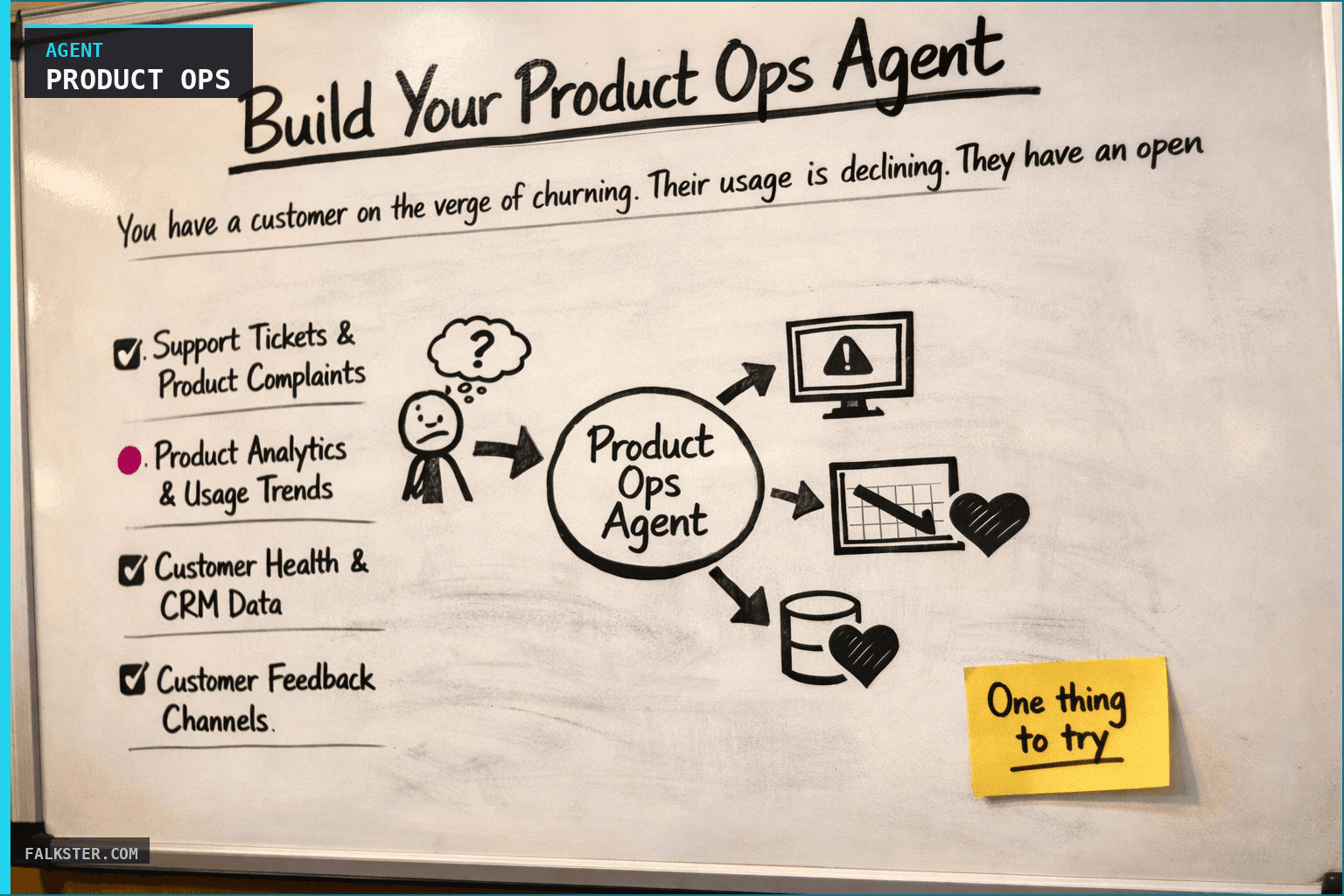
You have a customer on the verge of churning. Their usage is declining. They have an open support ticket that's been sitting for 5 days. They mentioned a competitor in a sales call last month. They want a feature you don't have. Nobody connected these dots until they sent the cancellation email.
This is what happens when you don't have a Product Ops system.
Most product teams operate reactively. A support ticket comes in. A customer's usage drops. A deal gets lost to a competitor. A feature request gets mentioned in Slack. You respond to each signal individually, usually after the problem is already critical.
What if instead, an agent ran every morning and showed you the complete operational health of your product - which customers are at highest churn risk, which product issues are costing you the most revenue, which features are customers actually demanding - ranked by business impact, not noise level?
Why You Need Daily Ops Intelligence
Product operations isn't sexy. It doesn't ship features. It doesn't close deals. But it's where you lose revenue.
Here's the pattern I see at companies with weak product ops:
A mid-market customer starts having issues. Their usage drops 20%. They open a support ticket about a feature gap. That ticket sits in the queue for a week. Meanwhile, in a sales call, they mention they're evaluating a competitor. The deal is lost. Now you're in firefighting mode.
If you'd been monitoring product ops daily, you would have seen:
- Day 1: Usage drop detected + open support ticket flagged + competitor mention in sales call = at-risk account
- Day 2: Product leadership reaches out proactively: "I see you're having issues with X. Let me connect you with our engineer." Crisis averted.
Instead, you noticed on day 8 when they sent the cancellation email.
Here's the core problem: product complaints, usage anomalies, and customer feedback are scattered across five different systems. Support tickets are in Zendesk. Usage data is in Amplitude. Customer health scores are in Salesforce. Feature requests are scattered across Slack, support chats, and Notion. Nobody's synthesizing this into a single view of "here's which customers are really at risk and why."
So you miss the signal.
What a good Product Ops agent does: it connects all of these signals daily, ranks them by business impact (ARR at risk), and surfaces the top issues that actually matter. Not all issues, just the ones that drive revenue.
How It Works: The Five Data Streams
The Daily Product Ops Agent monitors five streams of data and synthesizes them into a report focused on revenue impact:
1. Support Tickets & Product Complaints
The agent pulls your support system (Zendesk, Intercom) and looks for:
- Bugs or product gaps that customers are complaining about
- Complaints that affect multiple customers (sign of systemic issue)
- Complaints from high-value customers (those cost the most)
- Ticket urgency and how long they've been open
It ranks complaints by: "How much ARR is affected by this issue?" Not "how many tickets are there," but "how much revenue is at risk if we don't fix this?"
Example: One customer complained about export not working. That customer is $150K ARR. The agent surfaces this as a $150K ARR-impacting issue. Meanwhile, 5 customers want a feature you don't have, but they total $50K ARR together. The agent ranks the export issue higher because it affects more revenue.
2. Product Analytics & Usage Trends
The agent pulls your analytics system (Amplitude, Mixpanel) and looks for:
- Metrics that are declining (DAU down, core action completion down)
- Features that aren't being adopted (shipped 2 weeks ago, under 10% adoption)
- Performance metrics degrading (error rates up, latency up)
It's looking for: "Is something broken or wrong that users are reacting to?"
Example: Core action completion rate dropped 7% overnight. The agent correlates this to a platform change you deployed. It surfaces this as "potential platform issue impacting user workflows."
3. Customer Health & CRM Data
The agent pulls your CRM (Salesforce, HubSpot) and looks for:
- Accounts with declining usage + open product issues (churn risk)
- Accounts with declining usage + no recent check-in from the team
- Accounts that mentioned switching to a competitor
- Total ARR of at-risk accounts (business impact)
It connects CRM health scores to product issues: "This customer's usage is down AND they have an open issue blocking their workflow. That's not a coincidence."
Example: Enterprise-X ($500K ARR) has declining usage, last team check-in was 45 days ago, and they want a feature you don't have. The agent flags this as "$500K ARR at risk of churn."
4. Customer Feedback Channels
The agent searches Slack, support chat, and your feedback database for:
- Feature requests (what do customers actually want?)
- Bugs/issues customers mention informally
- Churn signals ("we're evaluating alternatives")
- Usability challenges
It aggregates this: "Which features are requested by the most customers? By the most valuable customers?"
Example: Seven customers from $425K total ARR have asked for "real-time collaboration" in the past week. The agent surfaces this as the #1 most-demanded feature.
5. App Store & Public Reviews
The agent pulls reviews from App Store, G2, Capterra and looks for:
- Common complaint themes (multiple users complaining about same issue)
- Star rating trends (are reviews trending up or down?)
- Sentiment shifts
Example: Five reviews this week mention "can't export data" or "performance with large datasets." These themes are appearing in support tickets too. The agent connects public complaints to internal support data.
What the Daily Report Looks Like
Every weekday at 9:00 AM, you get an operational health report with five sections:
Section 1: Top Product Complaints (Ranked by ARR Impact)
🔴 CRITICAL ISSUES (Affecting $100K+ ARR):

1. "Performance drops with 10K+ records" (Affecting $245K ARR)
   - Customers: Company A ($50K), Company B ($75K), Company C ($120K)
   - Status: Open, unresolved for 6 days
   - Recommended action: Prioritize engineering investigation,
     communicate ETA to customers

2. "API rate limits prevent bulk operations" (Affecting $380K ARR)
   - Customers: 5 accounts requesting increases
   - Status: Open, 3 new tickets in past 24 hours
   - Business impact: Expansion opportunity if we fix
   - Recommended action: Increase limits or create premium tier

🟡 HIGH IMPACT (Affecting $50K-$100K ARR):

3. "Can't export data to CSV" (Affecting $150K ARR)
   - Customer: TechCorp ($150K)
   - Status: Open, 6 hours
   - Timeline to ship: 3-5 days if prioritized
This is your revenue-weighted issue list. You see which problems matter most.
Section 2: Feature Gaps (Most-Requested Features)
TOP FEATURE REQUESTS:

🥇 "Real-time Collaboration" (Requested by 7 customers, $425K ARR)
   - Sentiment: "Competitor A has this, we love it"
   - Impact: Churn risk for 1 customer
   - Currently on roadmap? No
   - Recommended action: Get on roadmap or explain to customers

🥈 "Custom export formats" (Requested by 3 customers, $200K ARR)
   - Sentiment: "Need for our data pipeline"
   - Effort: Medium
   - Currently on roadmap? No

🥉 "SSO/SAML Authentication" (Requested by 2 customers, $300K ARR)
   - Customer type: Both enterprise
   - Currently on roadmap? Yes, Q2
   - Recommended action: Confirm timeline with customers
This is your prioritization framework. You see which features customers are actually demanding, weighted by ARR.
Section 3: Usage Anomalies & Metric Alerts
METRIC ANOMALIES:

🔴 RED FLAGS:
- Core action completion rate: 78% (↓7% vs 7-day avg)
  → Something broke. Investigate immediately.
- API error rate: 0.8% (was 0.5% last month, ↑0.3% yesterday)
  → Platform stability degrading. Engineering investigation needed.

🟡 YELLOW FLAGS:
- DAU: 2,847 (↓3% vs 7-day avg, stable vs 30-day avg)
  → Small dip but stable. Watch next week.
This is your early warning system. You see metric shifts that might indicate problems.
Section 4: At-Risk Customers (Highest Churn Risk)
🚨 AT-RISK CUSTOMERS: $725K ARR

🔴 IMMEDIATE CHURN RISK:
1. Enterprise-X ($500K ARR) - DECLINING USAGE
   - Last interaction: 45 days ago
   - Reason: Missing "real-time collaboration"
   - Competitor pressure: Evaluating Competitor A
   - Recommended action: Product leadership call THIS WEEK

2. TechCorp ($150K ARR) - WORKFLOW BLOCKED
   - Open issue: "Can't export to CSV"
   - Blocking daily work
   - Recommended action: Escalate feature, commit timeline by EOD
This is your churn risk list. You see which customers are most likely to leave, why, and what to do about it.
Section 5: Revenue Impact Summary
One paragraph with total ARR at risk and immediate actions:
REVENUE AT RISK: $725K ARR
- $500K at immediate churn risk (evaluating alternatives)
- $150K blocked on feature gap (export)
- $75K integration performance issue

IMMEDIATE ACTIONS:
1. Product leadership call with Enterprise-X this week
2. Commit to CSV export timeline to TechCorp by EOD today
3. CS team outreach to SalesFlow with performance investigation ETA
Data sources and setup
Prerequisites: Complete the Claude setup guide first. This agent needs the following MCP connections active:
- Jira - reads product issues, bugs, and feature requests
- GitHub - monitors deployment and release activity
- Zendesk - scans support tickets for product complaints and usage patterns
- PagerDuty - tracks active incidents and system health
- Salesforce - reads customer ARR, health scores, and churn risk signals
Schedule: Runs daily at 9:00 AM via cron. Output posts to Slack #product-ops.
Quick test: Open Claude and ask: "Give me today's operational health snapshot: velocity, support load, incidents, and deployment status."
For the full agent fleet and scheduling details, see Your AI Agent Fleet.
What changes when you have this
Without the agent, the problem unfolds one signal at a time. Usage drops Monday. A support ticket lands Wednesday. A sales call mentions a competitor on Friday. The cancellation email arrives the following Monday. Four separate events, four different systems, nobody connecting them.
With it, those same signals arrive together. Monday morning the report shows usage decline plus an open issue plus a competitor mention, tagged as one at-risk account. By 10am product leadership is on the phone. Churn avoided.
The difference is agency. You're not reacting to a cancellation email, you're reaching out while the customer is still deciding.
Most days the report just confirms things are healthy. But two or three times a week it catches an account or an issue that would have blown up quietly. That's worth 15 seconds to read.
Getting started this week
The full setup, with every data source, the ranking rules, the business-impact math, and a copy-paste prompt, is in the artifact linked below.
Download it. Create a Claude Project, paste the prompt, connect your data sources, set it for weekday mornings at 9:00 AM. By next week you'll have your first report: top complaints by revenue, most-demanded features, at-risk customers, metric anomalies, all in one view. And better prioritization calls off the back of it.
Download the full agent instruction file for copy-paste-ready setup, data extraction rules, and revenue impact calculation framework.
Download the artifact
Ready to use. Copy into your project or share with your team.
Also on Medium
Full archive →AI Agents and the Future of Work: A Pixar-Inspired Journey
What product managers can learn about AI agents from how Pixar runs a film team.
Many AI Agents Are Actually Workflows or Automations in Disguise
How to tell agents from workflows from cron jobs, and why it matters for what you ship.
Frequently asked
What does the Product Ops agent report every morning?+
Five sections ranked by business impact: top product complaints by ARR affected, most-requested feature gaps weighted by requesting customers, usage anomalies with red and yellow flags, at-risk customers with reasons and recommended actions, and a total revenue-at-risk summary with immediate actions. The key shift is ranking by ARR impact, not ticket volume.
What data sources does the Product Ops agent need?+
Five streams: Zendesk or Intercom for support tickets, Amplitude or Mixpanel for usage and analytics, Salesforce or HubSpot for customer health and CRM data, Slack and feedback databases for informal feature requests, and App Store reviews plus G2 or Capterra for public sentiment. The agent connects signals across all five and surfaces the intersections.
How does the agent catch churn risk before the cancellation email?+
It connects signals across systems that no human is stitching together daily: declining usage plus an open support ticket plus a competitor mention from a sales call plus no recent CS check-in. Any one of those alone is easy to miss. All four together is a clear at-risk flag. Day 1 detection instead of day 8.
How is ARR-weighted ranking different from ticket volume ranking?+
One customer complaining about a $150K ARR-blocking export bug ranks higher than five customers requesting a feature totaling $50K ARR, even though five tickets outnumber one. Most product teams prioritize by how loud or how frequent a complaint is. The Product Ops agent prioritizes by how much revenue is actually at stake.
What does the at-risk customer section look like?+
Each at-risk customer shows current ARR, the specific reason they are at risk (usage decline, feature gap, competitor evaluation, no recent check-in), and a specific recommended action with a deadline. The agent distinguishes immediate churn risk (contact this week) from high-priority watch (contact this month) so you are not treating a $500K ARR account the same as a $10K one.

Comments (0)
Sign in with LinkedIn to leave a comment.
Sign in with LinkedIn